
Users often seek iPhone jailbreak tools to bypass Apple's strict ecosystem, customize their devices, or remove activation locks. While legacy utilities defined early iOS customization, Apple's continuous kernel security enhancements have made stable, public jailbreaks increasingly rare. Whether you need to modify your system or regain access to a locked device, understanding the current landscape of modern jailbreaking utilities will help you choose the safest path forward.

Quick Answer: Top Paths for iPhone Jailbreak Tools
Depending on your hardware and firmware, there are a few primary ways to approach system modification safely:
- If you have an older device (iPhone X or earlier), hardware-based exploits like palera1n offer reliable access.
- For newer devices on specific iOS versions like jailbreak iOS 26.6, semi-untethered options like Dopamine are the standard.
- If your goal is bypassing an iCloud Activation Lock, specialized software automates the jailbreak and removal process.
Before you download jailbreak utility for iPhone files, assess your current device state to find the right approach:
- Device is iPhone X or older: Proceed with Method 1 utilizing the checkm8 hardware exploit.
- Device is newer (A12+) on iOS 15/16: Check Method 2 for a modern semi-untethered solution.
- Device is stuck on Activation Lock: Skip to Method 3 to automate the jailbreak and bypass process.
Method 1: Jailbreak Older iPhones With Palera1n
Palera1n is widely considered the best iPhone jailbreaking software for devices vulnerable to the checkm8 exploit (iPhone 5s through iPhone X). It provides a developer-focused environment for iOS 15 and iOS 16.
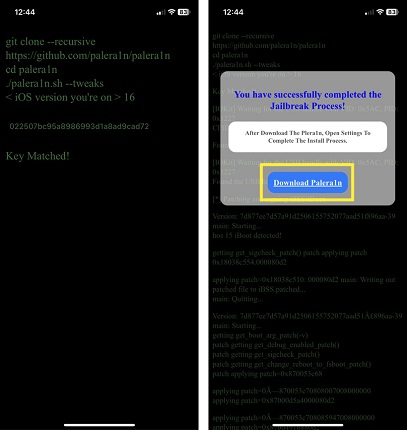
- Download the palera1n script from the official GitHub repository to your Mac or Linux computer.
- Connect your iPhone using a high-quality USB-A to Lightning cable.
- Open your terminal, navigate to the download folder, and execute the palera1n command.
- Follow the on-screen terminal prompts to place your iPhone into DFU mode.
- Wait for the script to boot the device and install the bootstrap environment.
Pros
- Permanent hardware exploit Apple cannot patch
- Supports iOS 15 and 16 on older chips
Cons
- Requires a Mac or Linux machine to execute
- Only works on A11 processors and older
This method is highly reliable but strictly limited to older hardware architectures.
Method 2: Use Dopamine for Newer iOS Versions
If you are looking for an iOS jailbreak tool for latest version compatibility on newer devices (A12 and up), Dopamine is the current standard. It is a semi-untethered jailbreak, meaning you must re-run the app after every reboot.
- Install a sideloading utility like TrollStore or AltStore on your computer and sync it to your iPhone.
- Download the Dopamine file from the official developer website.
- Open your sideloading app on the iPhone and install the Dopamine file.
- Launch the Dopamine app from your home screen and tap Jailbreak.
- Allow the device to respring and verify that your package manager appears.
Pros
- Works on modern A12+ devices
- Easy app-based execution without a computer after initial setup
Cons
- Untethered requires re-activation after reboot
- Strict iOS version limits
Dopamine offers a clean, modern jailbreak experience provided your device falls within the specific supported iOS firmware window.
Feature Comparison of Modern iPhone Jailbreak Utilities
Jailbreak Tool | Primary Purpose | Device Compatibility | Technical Skill | Computer Required |
Palera1n | System modification | iPhone X and older | High | ✅ Yes |
Dopamine | Modern customization | A12+ devices | Medium | ⚠️ Initial Setup |
Tenorshare 4uKey | Activation Lock bypass | Supported locked models | Low | ✅ Yes |
Method 3: Bypass Activation Lock With Tenorshare 4uKey
When your primary goal for finding iPhone jailbreak tools is to bypass an iCloud Activation Lock, standard utilities require complex manual terminal commands. Tenorshare 4uKey automates the jailbreak process specifically to remove the activation lock screen, making it accessible even if you lack technical expertise. It also helps with unlocking standard screen passcodes on supported models.
Follow these steps to automate the jailbreak and regain access to your locked device.
Step 1: Download and Install 4uKey
Launch the software, and select "Remove iCloud Activation Lock" to get past the iPhone Activation Lock.

Step 2: Connect Your iPhone to the Computer
Plug your iPhone into the computer using a USB cord so that 4uKey can instantly recognize it. Click "Next" to proceed with taking off the iCloud Activation Lock.

Step 3: Put the Device in Recovery Mode
To avoid harming the file system, your phone will initially go into recovery mode. Kindly wait a moment while this happens.

Step 4: Perform a Jailbreak on Your iPhone
Once that is complete, the jailbreak procedure will start on your iPhone. Please give it some time to finish.

Afterward, your iPhone will be fully jailbroken. Press the button shown on the screen to move forward.

Step 5: Eliminate the iCloud Activation Lock
Next, 4uKey will take care of bypassing the iCloud activation lock on its own.

Shortly after, you will notice that the iCloud activation lock has been completely cleared from your device.

This automated approach handles the complex system modifications for you, providing a direct path to bypass activation barriers.
How to Jailbreak iPhone Safely and Avoid Risks
Modifying your iOS kernel carries inherent risks, including boot loops or data loss. Taking precautions ensures you do not permanently damage your device.
- Always create a full encrypted backup via Finder or iTunes before attempting any system modification.
- Only download jailbreak utility for iPhone files from official developer GitHub pages or verified websites to avoid malware.
- Avoid installing incompatible tweaks from unknown repositories, as these are the primary cause of system crashes.
- Do not update your iOS version if you want to maintain your jailbroken state, as Apple patches exploits in new releases.
Final Thoughts on Modifying Your iOS Device
The era of simple, one-click untethered jailbreak tools for iPhone has largely passed, replaced by specialized utilities tailored to specific hardware and firmware combinations. If you have an older device, palera1n provides a robust hardware-level solution. For newer models on specific firmware, Dopamine is the safest semi-untethered choice. However, if your goal is strictly to bypass an iCloud lock, utilizing an automated tool like Tenorshare 4uKey is the most efficient path forward.
FAQ
Q: Are there any untethered jailbreak tools for iPhone available today?
A: True untethered jailbreaks, which persist permanently after a reboot without requiring an app to re-enable them, are extremely rare on modern iOS versions. Most current tools are semi-untethered, requiring you to re-run an app on the device after it restarts.
Q: Is it legal to download jailbreak utility for iPhone software?
A: Yes, jailbreaking your own device is legal in most jurisdictions under exemptions to digital copyright laws. However, it does void your Apple warranty, and Apple support may refuse service for modified devices.
Q: Will jailbreaking erase my personal data?
A: The jailbreak process itself usually does not erase data, but a failed attempt can force your device into a boot loop. If this happens, you will have to restore the device to factory settings, which is why a complete backup is mandatory beforehand.
Q: Can Tenorshare 4uKey jailbreak my iPhone permanently?
A: Tenorshare 4uKey uses a jailbreak temporarily as part of its process to bypass the iCloud Activation Lock. If you restart or factory reset the device after the bypass, the lock may return, and the jailbreak state is not meant for installing custom tweaks.

