
Many users search for how to jailbreak an iPhone 14 because they are locked out and want to bypass the passcode. If your actual goal is to regain access to a disabled phone, jumping straight to official Apple recovery paths or trusted desktop unlock tools is the safest first action.

Why Is Jailbreaking the iPhone 14 Restricted?
Jailbreaking the iPhone 14 requires finding vulnerabilities in the software, as Apple’s newer A15 Bionic chips do not have the permanent hardware exploits found in older models. When Apple releases a new iOS update, they patch these security gaps, making it impossible to jailbreak if you install the latest software. Because of this, your options depend entirely on your firmware.
If you stayed on an early iOS 16 release, you have access to partial jailbreaks or advanced sideloading tools. If you updated to newer software, you must wait for future developers to find new exploits. Is iPhone 14 jailbreak possible on iOS 17? Currently, no public full jailbreak exists for iOS 17 on this hardware. Before proceeding, check your version in Settings > General > About to see which path applies to you.

6 Methods to Jailbreak or Modify the iPhone 14
Depending on your iOS version and whether you have access to a computer, review these approaches to find the right iPhone 14 jailbreak step by step guide for your situation.
Comparison of iPhone 14 Modification Methods
| Option | iOS Compatibility | Computer Required | Modification Type | Primary Use Case |
| TrollStore | iOS 16.0 - 16.5 | No | Sideloading | Permanent app installs |
| Tenorshare 4uKey | All Versions | Yes | Device Unlock | Bypassing forgotten passcodes |
| Dopamine | iOS 15.0 - 16.5 | Yes | Rootless Jailbreak | Installing system tweaks |
| Cowabunga Lite | Newer iOS | Yes (Mac only) | System Customization | Safe UI changes |
| Sileo / Zebra | iOS 15.0 - 16.5 | No | Package Manager | Managing tweak files |
| AltStore | All Versions | Yes | Sideloading | 7-day app installs |
Method 1: Install TrollStore for iOS 16.0 to 16.5 (No Computer Required)
If your device is running iOS 16.0 through 16.5, TrollStore is one of the most popular ways to install modified apps without standard sideloading limits. This approach effectively allows you to jailbreak iPhone 14 without computer access using a Safari-based installation link.
- Open Safari on your iPhone 14 and navigate to the official TrollInstallerX GitHub or verified host page.
- Tap the installation link to download the TrollInstallerX profile directly to your device.
- Go to Settings > General > VPN & Device Management and trust the newly downloaded profile.
- Open the TrollInstallerX app from your home screen and follow the prompts to install TrollStore.
Once installed, you can use TrollStore to permanently sideload IPA files without the usual seven-day expiration. Keep in mind that updating your iOS version will break TrollStore and revoke your apps.
Method 2: Remove iCloud Activation Lock without Jailbreak iPhone 14
Many users search for jailbreak tools because they forgot their passcode and hope a system modification will bypass the lock screen. Jailbreaking cannot bypass a forgotten passcode on modern hardware. If you are locked out of your iPhone 14 and official Apple recovery methods fail, a dedicated desktop unlock tool like Tenorshare 4uKey is the correct path. This software resets the device to remove the lock, allowing you to regain access.
When to Consider Using Tenorshare 4uKey
- Support for iPhone Unavailable, Disabled, Security Lockout, and forgotten-passcode scenarios.
- Supports multiple passcode types, Touch ID, and Face ID-related lockout scenarios.
- One-click iPhone and iPad passcode unlocking.
- Remove Screen Time passcode without data loss.
- Windows and Mac support.
Ensure you have a recent backup available, as removing a lock screen passcode requires a complete device reset.
Step 1: Download and Install 4uKey
Download and install 4uKey on your computer. Open the software and choose "Remove iCloud Activation Lock".

Step 2: Connect iPhone to Computer
Connect your iPhone to the computer with a USB cable. The program will detect your device automatically. Click "Next" to continue.

Step 3: Enter Recovery Mode
The software will place your device into recovery mode. Wait a moment for this to happen.

Step 4: Jailbreak Your iPhone
Your iPhone will now begin the jailbreak process. Keep the device connected and wait.

When the jailbreak is done, click the on-screen button to move to the next step.

Step 5: Remove iCloud Activation Lock
The tool will now remove the activation lock from your phone.

Wait for the process to finish, then check your device screen.

Method 3: Apply the Dopamine Jailbreak for Supported iOS 16 Versions
Dopamine is among the best jailbreak tools for iPhone 14 if you are on iOS 15.0 through 16.5. It is a rootless jailbreak, meaning it modifies the system without altering the core root files, which helps avoid detection by banking apps.
- Download the Dopamine IPA file from the official developer website using your computer or device.
- Sideload the IPA onto your iPhone 14 using a tool like AltStore or Sideloadly.
- Navigate to Settings > General > VPN & Device Management and trust your developer certificate.
- Open the Dopamine app on your home screen and tap Jailbreak.
Your device will reboot during the process. Because it is semi-untethered, you will need to re-run the Dopamine app every time your iPhone restarts to reactivate your tweaks.
Method 4: Use Cowabunga Lite via Mac for System Customization
If your iOS version is too new for a full jailbreak, Cowabunga Lite offers a way to customize your iPhone 14 without actually exploiting the system. It uses standard backup and restore mechanisms to apply themes and minor tweaks.
- Download the Cowabunga Lite application on your Mac.
- Connect your iPhone 14 to the computer using a USB cable and ensure it is unlocked and trusted.
- Open Cowabunga Lite and select the customizations you want, such as hiding the dock or applying custom icon themes.
- Click Apply. The tool will create a modified partial backup and restore it to your device.
This method does not install a package manager, but it is safe and works on newer iOS versions where traditional jailbreaks fail.
Method 5: Install Sileo or Zebra (Modern Cydia Alternatives)
Historically, users wanted to know how to install Cydia on iPhone 14. However, Cydia has not been updated for modern rootless jailbreaks. Today, Sileo and Zebra are the standard package managers installed alongside tools like Dopamine.
- Complete a rootless jailbreak using Dopamine or a similar supported tool.
- During the initial jailbreak setup, the tool will prompt you to select a default package manager.
- Select Sileo or Zebra from the list and allow the installation to finish.
- Open Sileo from your home screen to browse and install iOS 16 compatible tweaks.
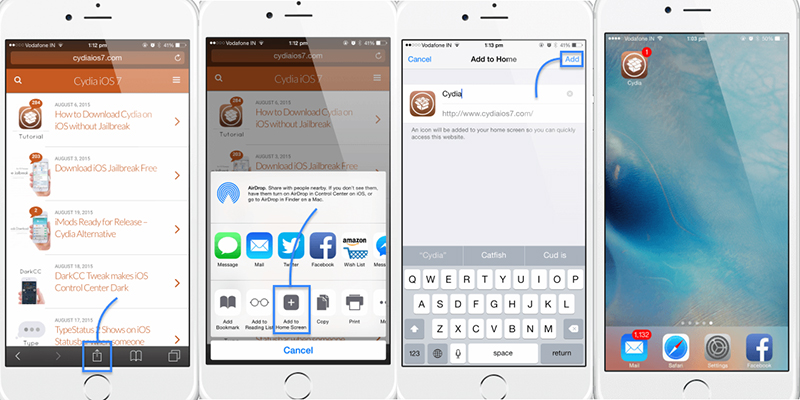
Do not attempt to force-install older versions of Cydia via third-party repositories, as this can cause boot loops on modern iOS architecture.
Method 6: Sideload Apps via AltStore (Non-Jailbreak Alternative)
If you cannot jailbreak your iPhone 14 due to firmware limitations, AltStore provides a safe way to install modified applications, emulators, or tweaked social apps without compromising system security.
- Download AltServer on your Windows or Mac computer and install the Mail plug-in if prompted.
- Connect your iPhone 14 to the computer and open AltServer.
- Select Install AltStore from the menu bar and choose your connected device.
- Enter your Apple ID credentials to sign the application.
- Once AltStore appears on your iPhone, go to Settings > General > VPN & Device Management to trust the app.
You must connect your iPhone to the same Wi-Fi network as your computer once every seven days to refresh the app certificates, otherwise the sideloaded apps will expire.
What to Verify After Modifying Your iPhone 14
Once you have successfully applied a jailbreak or sideloading tool, it is critical to verify your system stability and security. Jailbreaking removes some of Apple’s built-in protections, making your device more vulnerable to malicious software.
- Change your default root password immediately if you are using a tool that enables SSH access.
- Check if your banking or secure enterprise apps still open, as many will crash if they detect a modified system.
- Monitor your battery life and device temperature over the first 48 hours, as poorly optimized tweaks can cause rapid draining.
If your device becomes unstable, you may need to boot into safe mode and remove the most recently installed tweak.
How to Avoid Losing Your Jailbreak Status
Maintaining a modified system requires strict control over your software updates. If Apple installs a new version of iOS overnight, your jailbreak will be permanently erased, and you will not be able to downgrade.
- Navigate to Settings > General > Software Update.
- Tap Automatic Updates and turn off Download iOS Updates and Install iOS Updates.
- Consider installing a tvOS beta profile, which blocks the iPhone from communicating with Apple's standard update servers.
Always verify compatibility on developer forums before installing any new package manager updates to prevent accidental boot loops.
Final Thoughts
Modifying your device depends entirely on the iOS version currently installed. If you are on an early release like iOS 16.5, tools like Dopamine or TrollStore provide extensive access. If you have updated past the vulnerable firmware, sideloading through AltStore is the most reliable alternative. For users who are simply trying to bypass a forgotten passcode, skip the jailbreak attempts and use standard recovery procedures or trusted unlock software to regain access.
FAQ
Q: Can the iPhone 14 Plus be jailbroken?
A: Yes, it can be jailbroken if it is running a compatible firmware version, such as iOS 16.0 through 16.5. The process and tool availability are identical to the standard iPhone 14 models.
Q: Can the iPhone 14 Plus be jailbroken on iOS 17?
A: Currently, there is no public full jailbreak available for the iPhone 14 Plus running iOS 17. Apple patched the necessary exploits, so you must wait on your current firmware for future developments.
Q: Can the iPhone 14 Plus be jailbroken without a computer?
A: If you are on a supported iOS 16 version, you can use Safari-based installation methods like TrollInstallerX to apply tweaks without a computer. However, sideloading tools like AltStore do require a Mac or PC for the initial setup.
Q: Does jailbreaking the iPhone 14 delete my data?
A: Applying a standard jailbreak usually keeps your local data intact. However, if you run into a boot loop and are forced to restore your device via iTunes or an unlock tool like Tenorshare 4uKey, your data will be erased unless you have a backup.
Q: Will Apple fix my iPhone 14 if I jailbreak it?
A: Jailbreaking voids your Apple warranty. If you need hardware service, you must completely restore the device to its factory settings to remove the jailbreak before taking it to an authorized support center.

